Power Point Installation Cost in Brisbane (2026): $150–$300 Per Outlet
Power point installation cost in Brisbane: $150-$300 per outlet. See real job examples from a Capalaba electrician. USB, outdoor, 15A — all priced honestly.
How much does it cost to install a power point in Brisbane? For a standard double power point on an existing circuit, you’re looking at $150–$300 including labour and materials. At Amplus Electrical & Air, we charge a flat $150/hour with no call-out fee, so most power point installations cost around $150–$250.
But if you need a new circuit run from the switchboard, the cost jumps to $400–$700. And if your home has old wiring that needs upgrading, it can cost even more.
In this guide, I’ll break down exactly what you’ll pay for power point installation in Brisbane in 2026 — including the factors that push the price up, real examples from jobs we’ve done, and how to save money without cutting corners.
Power Point Installation Costs in Brisbane: The Real Numbers
Here’s what you can expect to pay for power point installation in Brisbane in 2026:
| Job Type | Cost Range | Time |
|---|---|---|
| Standard double power point (existing circuit) | $150–$300 | 30–60 minutes |
| USB power point (existing circuit) | $180–$350 | 30–60 minutes |
| Outdoor weatherproof power point | $200–$400 | 1–2 hours |
| 15A power point (for air conditioners, ovens) | $200–$400 | 1–2 hours |
| Power point on new circuit (from switchboard) | $400–$700 | 2–4 hours |
| Multiple power points (3+ on same circuit) | $120–$250 each | Varies |
| Smart power point (WiFi/app-controlled) | $200–$400 | 30–60 minutes |
These prices include: labour, materials (power point, cables, connectors), and a compliance certificate. No hidden extras.
At Amplus Electrical & Air: We charge $150/hour with no call-out fee. Most standard power point installations take 30–60 minutes, so you’re looking at $75–$150 for labour, plus $30–$80 for materials.
What Affects the Cost of Installing a Power Point?
1. Existing Circuit vs. New Circuit
The biggest cost factor: Can we connect the new power point to an existing circuit, or do we need to run a new cable from the switchboard?
Existing circuit ($150–$300): If there’s an existing circuit with spare capacity, we can tap into it. This means running a cable from the nearest power point or junction box to the new location. It’s straightforward and affordable.
New circuit ($400–$700): If the existing circuits are at full capacity (typically 20 power points per circuit), we need to run a new cable from the switchboard. This involves:
- Installing a new circuit breaker in the switchboard
- Running a new cable through the walls or ceiling
- Connecting the new power point to the dedicated circuit
This takes more time and materials, so it costs more.
2. Wall Type and Access
Brick walls ($50–$150 extra): Running cables through brick walls is harder than through plaster walls. We need to drill through masonry, which takes more time and requires specialised tools.
Double-brick walls ($100–$200 extra): Even harder. The walls are thicker, and there’s less room to manoeuvre.
Concrete walls ($150–$300 extra): The most difficult. We need a hammer drill and more time. In some cases, surface-mounted conduits are a cheaper alternative.
Asbestos walls ($200–$500 extra): If your home was built before 1990 and has asbestos cement sheet walls, we need to take special precautions. This includes sealing the work area, using specialised tools, and disposing of asbestos safely. In some cases, we recommend a licensed asbestos removalist.
3. Distance from Switchboard
Close to switchboard ($150–$300): If the new power point is near the switchboard, we can run a short cable. This is the cheapest option.
Far from switchboard ($300–$600): If the power point is on the other side of the house, we need to run a longer cable. This might involve going through the roof cavity, under the house, or along external walls. More cable = more cost.
4. Type of Power Point
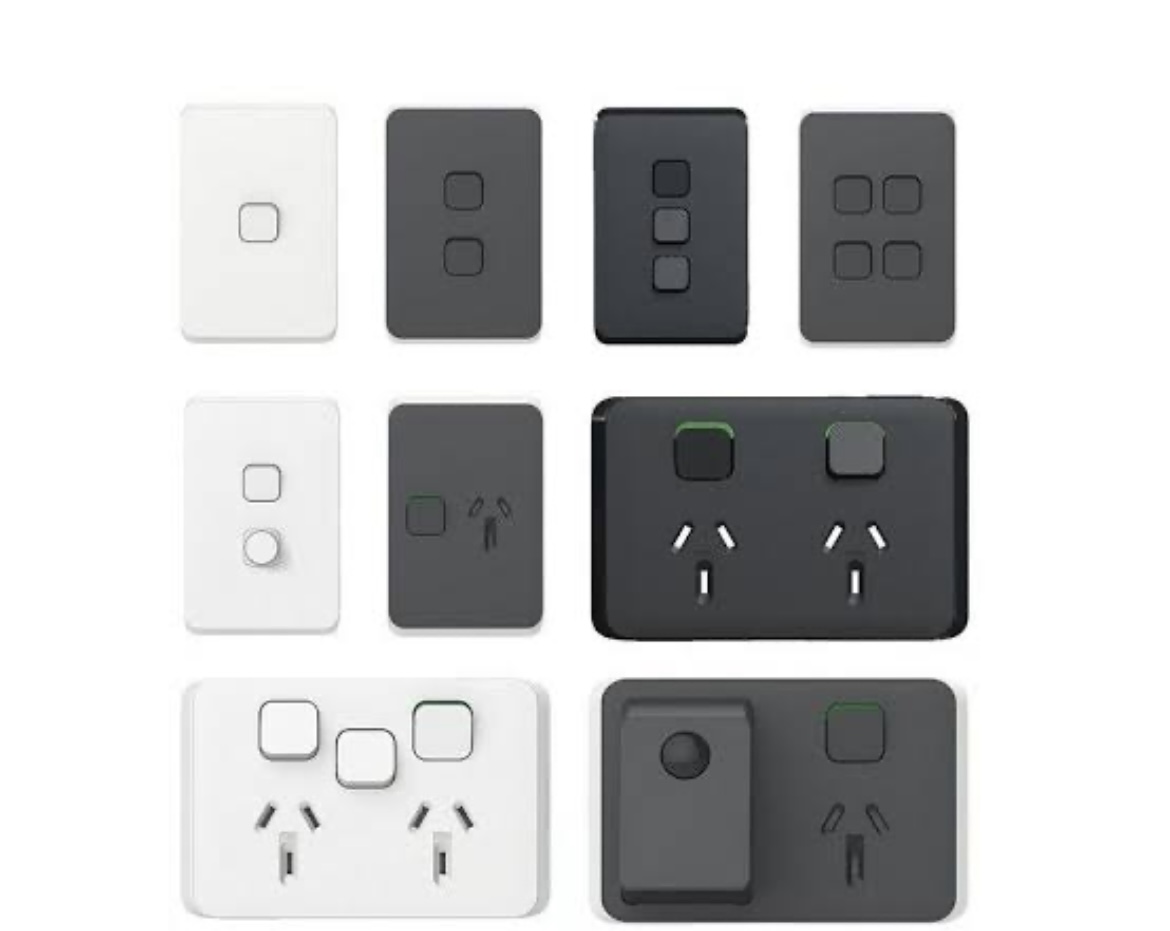
Standard double ($30–$60 for the outlet): The most common and affordable option.
USB power point ($50–$100 for the outlet): Has built-in USB ports for charging phones and tablets. More expensive but convenient.
15A power point ($40–$80 for the outlet): Required for high-draw appliances like air conditioners, ovens, and large fridges. Has a larger pin configuration.
Weatherproof outdoor ($60–$120 for the outlet): Has a weatherproof cover to protect against rain and dust. Required for outdoor installations.
Smart power point ($80–$150 for the outlet): WiFi-enabled, can be controlled via an app or voice assistant. More expensive but gives you remote control and energy monitoring.
5. Number of Power Points
Single power point ($150–$300): The standard rate.
Multiple power points ($120–$250 each): If you’re installing 3 or more power points at the same time, we can often batch the work and reduce the cost per point. This is because we’re already on-site and can run cables more efficiently.
6. Old Wiring
Ceramic fuses ($200–$500 extra): If your home has old ceramic fuses instead of circuit breakers, we may need to upgrade the switchboard before we can install new power points. This is a safety (burning smell from power point) requirement.
VIR wiring ($500–$2,000 extra): If your home has old rubber-insulated wiring (common in homes built before 1970), it may need to be replaced. This is a big job, but it’s necessary for safety.
Brisbane-Specific Considerations
Queensland Electrical Regulations
Queensland has strict rules about where power points can be installed:
- Bathrooms: Power points must be at least 600mm from the edge of the bath or shower. They must also be on an RCD-protected circuit.
- Kitchens: Power points must be at least 300mm from the sink. Benchtop power points must be on a dedicated circuit.
- Outdoor areas: All outdoor power points must be weatherproof and RCD-protected.
- Laundries: Power points must be RCD-protected and at least 600mm from the trough.
These rules exist for your safety. A licensed electrician will ensure your installation complies with all regulations.
Older Brisbane Homes
Many Brisbane homes built before 1980 have electrical systems that weren’t designed for modern power demands:
- Insufficient power points: Older homes might have only 2–3 power points per room. Modern homes need 6–8 per room.
- Old wiring: Rubber-insulated wiring (VIR) or even ceramic fuses. These need upgrading before new power points can be added safely.
- Asbestos: Homes built before 1990 may have asbestos cement sheet walls. Special precautions are needed when drilling.
- Termite damage: Brisbane’s subtropical climate means termite risk is high. Termite damage to timber framing can make cable routing difficult.
If your home has old wiring, we’ll flag it during the quote and give you options for upgrading.
Signs You Need More Power Points
If any of these sound familiar, your home probably needs more power points:
- You’re relying on extension cords and power boards: This is a fire hazard. Extension cords are meant for temporary use, not permanent solutions.
- Circuit breakers keep tripping: This means the circuit is overloaded. Adding more power points to the same circuit won’t fix it — you need a new circuit.
- You have double adaptors plugged into power boards: This is a major fire risk. It’s a sign you don’t have enough outlets.
- You’re unplugging one appliance to use another: If you’re constantly swapping appliances between outlets, you need more power points.
- Your power points feel hot to the touch: This is a sign of overloaded circuits or loose wiring. Get it checked immediately.
- You smell burning near power points: This is a serious warning sign. Turn off the power and call an electrician immediately.
Extension Cords: Why They’re a Fire Hazard
Extension cords and power boards are convenient, but they’re not a long-term solution. Here’s why:
- Overloading: Most extension cords are rated for 10A (2,400W). If you plug in multiple high-draw appliances (heaters, air conditioners, microwaves), you can overload the cord and cause a fire.
- Trip hazard: Extension cords running across floors are a trip hazard, especially for elderly people and children.
- Damage: Extension cords can be damaged by furniture, doors, or foot traffic. Damaged cords expose live wires and create a shock risk.
- Insurance: If a fire is caused by an overloaded extension cord, your home insurance may not cover the damage.
The solution: Install permanent power points where you need them. It’s safer, more convenient, and adds value to your home.
Power Point Safety: What You Need to Know
RCD (Residual Current Device) Protection
All power points in Queensland must be protected by an RCD (also called a safety switch). An RCD detects electrical faults and cuts the power in milliseconds, preventing electrocution.
If your home doesn’t have RCD protection, we’ll install it as part of the power point installation. Cost: $180–$300 per RCD.
Arc Fault Detection
Arc faults occur when electricity jumps across a gap in a damaged wire or loose connection. They’re a leading cause of electrical fires.
Modern switchboards can include arc fault detection devices (AFDDs) that detect and interrupt arc faults. Cost: $150–$300 per device. Recommended for older homes.
Child Safety
If you have young children, consider installing child-safe power points. These have shutters that prevent children from inserting objects into the outlets. Cost: $40–$80 per outlet (vs. $30–$60 for standard outlets).
Real Examples: Power Point Installations We’ve Done in the Redlands
Example 1: Double Power Point in Capalaba Kitchen
The problem: Customer needed an extra power point for a new microwave. The existing kitchen circuit had spare capacity.
What we did: We ran a cable from the nearest existing power point to the new location (about 2 metres). We installed a standard double power point and tested the circuit.
The cost:
- Labour: 45 minutes @ $150/hour = $112.50
- Materials (cable, power point, connectors): $45
- Total: $157.50
Lesson: If you have spare circuit capacity, adding a power point is straightforward and affordable.
Example 2: USB Power Points in Cleveland Home Office
The problem: Customer was tired of using USB chargers that took up power point slots. They wanted USB power points for their home office desk.
What we did: We replaced 3 existing standard power points with USB power points. The existing circuit had spare capacity, so no new wiring was needed.
The cost:
- Labour: 1 hour @ $150/hour = $150
- Materials (3 USB power points): $210
- Total: $360
Lesson: USB power points are a great upgrade for home offices and bedrooms. They free up outlets and charge devices faster.
Example 3: Outdoor Power Point in Alexandra Hills
The problem: Customer wanted an outdoor power point for Christmas lights and outdoor entertaining. The nearest indoor power point was 8 metres away.
What we did: We ran a new cable from the switchboard to the outdoor location (through the roof cavity and down the external wall). We installed a weatherproof outdoor power point with an RCD-protected circuit.
The cost:
- Labour: 2 hours @ $150/hour = $300
- Materials (cable, weatherproof power point, RCD): $120
- Total: $420
Lesson: Outdoor power points need to be weatherproof and RCD-protected. Running a new circuit adds cost but ensures safety.
Example 4: 15A Power Point for Air Conditioner in Victoria Point
The problem: Customer installed a new air conditioner but the existing power point was only 10A. The AC required a dedicated 15A circuit.
What we did: We ran a new 15A circuit from the switchboard to the AC location. We installed a 15A power point and a dedicated circuit breaker.
The cost:
- Labour: 2.5 hours @ $150/hour = $375
- Materials (15A cable, power point, circuit breaker): $95
- Total: $470
Lesson: High-draw appliances like air conditioners, ovens, and large fridges need dedicated 15A circuits. Don’t try to run them on a standard 10A circuit.
Example 5: 6 Power Points in Renovated Thornlands Home
The problem: Customer was renovating their lounge room and needed 6 new power points (3 for lamps and TV, 2 for side tables, 1 for a floor lamp).
What we did: We ran cables from the existing circuit to all 6 locations. Because we were doing multiple power points at once, we were able to batch the work and reduce the cost per point.
The cost:
- Labour: 3 hours @ $150/hour = $450
- Materials (6 power points, cable, connectors): $180
- Total: $630 ($105 per power point)
Lesson: If you need multiple power points, batch them together. The cost per point drops significantly.
Types of Power Points: Which One Do You Need?
1. Standard Double Power Point
Best for: General use in living rooms, bedrooms, and kitchens.
Cost: $30–$60 for the outlet.
Pros: Affordable, widely available, fits most appliances.
Cons: No USB ports, no smart features.
2. USB Power Point
Best for: Home offices, bedrooms, and kitchens where you charge phones and tablets.
Cost: $50–$100 for the outlet.
Pros: Built-in USB ports, charges devices faster, frees up outlets.
Cons: More expensive than standard outlets.
3. 15A Power Point
Best for: Air conditioners, ovens, large fridges, and other high-draw appliances.
Cost: $40–$80 for the outlet.
Pros: Handles high-draw appliances safely.
Cons: Requires a dedicated circuit, more expensive to install.
4. Weatherproof Outdoor Power Point
Best for: Outdoor areas, garages, and sheds.
Cost: $60–$120 for the outlet.
Pros: Weatherproof cover protects against rain and dust.
Cons: More expensive, requires RCD protection.
5. Child-Safe Power Point
Best for: Homes with young children.
Cost: $40–$80 for the outlet.
Pros: Shutters prevent children from inserting objects.
Cons: Slightly more expensive than standard outlets.
6. Smart Power Point
Best for: Home automation, energy monitoring, remote control.
Cost: $80–$150 for the outlet.
Pros: WiFi-enabled, can be controlled via app or voice assistant, energy monitoring.
Cons: More expensive, requires WiFi setup.
How Long Does It Take to Install a Power Point?
Standard power point (existing circuit): 30–60 minutes.
Power point on new circuit: 2–4 hours.
Multiple power points (batched): 1–3 hours for 3–6 power points.
Outdoor power point: 1–2 hours.
15A power point: 1–2 hours.
These times assume straightforward access. If we need to drill through brick or concrete, or if there’s limited access, it can take longer.
Understanding Your Home’s Electrical System
How Circuits Work
Your home’s electrical system is divided into circuits. Each circuit is protected by a circuit breaker (or fuse) in your switchboard. A standard 10A circuit can handle up to 2,400 watts of power.
Typical circuit capacity:
- 10A circuit: Up to 2,400W — suitable for lights, TVs, computers, and small appliances
- 15A circuit: Up to 3,600W — required for air conditioners, ovens, and large fridges
- 20A circuit: Up to 4,800W — used for high-demand appliances like electric cooktops
When you add a new power point, we check if the existing circuit has spare capacity. If it doesn’t, we need to run a new circuit from the switchboard.
Switchboard Capacity
Your switchboard has a limited number of circuit breaker slots. If all slots are full and you need a new circuit, we may need to:
- Install a sub-switchboard: This adds more circuit breaker slots. Cost: $400–$800.
- Upgrade the main switchboard: This is more expensive but gives you more capacity. Cost: $1,200–$2,500.
We’ll assess your switchboard during the quote and let you know if an upgrade is needed.
Wiring Types: What’s in Your Walls?
Modern Wiring (TPS — Thermoplastic Sheathed)
Used in: Homes built after 1980.
Characteristics: White sheath, PVC insulation, safe and durable.
Cost to work with: Standard rates. Easy to install and maintain.
Old Wiring (VIR — Vulcanised Rubber Insulated)
Used in: Homes built before 1970.
Characteristics: Rubber insulation that becomes brittle over time. Often has ceramic fuses instead of circuit breakers.
Cost to work with: May need to be replaced. Cost: $500–$2,000 depending on the extent of the rewiring.
Safety risk: VIR wiring can crack and expose live wires. It’s a fire hazard and should be replaced as soon as possible.
Aluminium Wiring
Used in: Some homes built in the 1960s–1970s.
Characteristics: Aluminium instead of copper. Less conductive and more prone to overheating at connections.
Cost to work with: May need special connectors or replacement. Cost: $800–$2,500.
Safety risk: Aluminium wiring can overheat at connections and cause fires. It should be inspected by a licensed electrician.
Permits and Compliance in Queensland
Do You Need a Permit?
For standard power point installation, you don’t need a separate permit. However, all electrical work must be done by a licensed electrician and must comply with the Queensland Electrical Safety Act 2002.
Compliance Certificate
After completing the work, your electrician must provide you with an Electrical Safety Certificate within 30 days. This certificate confirms that the work complies with all safety standards.
What the certificate covers:
- The work was done by a licensed electrician
- The installation complies with Australian Standards (AS/NZS 3000)
- The work has been tested and is safe to use
Keep this certificate: You’ll need it when you sell your home or if you make an insurance claim.
Notifying Energex
For most power point installations, you don’t need to notify Energex (your electricity distributor). However, if you’re installing a new switchboard or upgrading your service, we need to notify Energex. We handle this for you as part of the job.
Maintenance Tips for Power Points
Regular Inspection
Check your power points every 6 months for:
- Cracks or damage: Cracked outlets can expose live wires and are a shock hazard.
- Loose connections: If plugs fall out easily, the outlet is worn and needs replacing.
- Discolouration: Brown or black marks around the outlet indicate overheating. Turn off the power and call an electrician immediately.
- Burning smell: This is a serious warning sign. Turn off the power at the switchboard and call an electrician immediately.
When to Replace Power Points
Power points should be replaced if:
- They’re cracked or damaged
- Plugs fall out easily (worn internal contacts)
- They feel hot to the touch
- They show signs of discolouration or burning
- They’re more than 25 years old (older outlets may not meet current safety standards)
Cost to replace: $120–$250 per outlet including labour and materials.
Avoiding Overloads
To prevent overloading your power points:
- Don’t use double adaptors: These can overload the outlet and cause a fire.
- Use power boards with surge protection: These have built-in circuit breakers that trip if the board is overloaded.
- Don’t plug high-draw appliances into power boards: Heaters, air conditioners, and microwaves should be plugged directly into wall outlets.
- Spread appliances across multiple outlets: Don’t plug all your high-draw appliances into the same power point or circuit.
Energy Efficiency: Smart Power Points
What Are Smart Power Points?
Smart power points are WiFi-enabled outlets that can be controlled via a smartphone app or voice assistant (like Alexa or Google Home). They offer features like:
- Remote control: Turn appliances on and off from anywhere.
- Scheduling: Set appliances to turn on and off automatically.
- Energy monitoring: Track how much electricity each appliance is using.
- Voice control: Use voice commands to control appliances.
Are Smart Power Points Worth It?
Pros:
- Convenient remote control
- Energy savings through scheduling and monitoring
- Integration with smart home systems
Cons:
- More expensive than standard outlets ($80–$150 vs. $30–$60)
- Require WiFi setup
- May not work with all appliances (especially high-draw appliances)
Verdict: Smart power points are worth it if you want remote control and energy monitoring. They’re especially useful for hard-to-reach outlets or for controlling appliances when you’re away from home.
Energy Monitoring
Some smart power points include energy monitoring, which shows you how much electricity each appliance is using. This can help you identify energy-hungry appliances and reduce your power bills.
Example: You might discover that your old fridge is using 30% more electricity than a new energy-efficient model. Replacing it could save you $100–$200 per year on your power bill.
Can I Install a Power Point Myself?
No. In Queensland, only a licensed electrician can install power points. DIY electrical work is illegal and can result in:
- Fines: Up to $40,000 for individuals.
- Voided insurance: If a fire is caused by DIY electrical work, your home insurance won’t cover the damage.
- Safety risks: Electrical work is dangerous. You risk electrocution, fire, and damage to your appliances.
- Sale issues: When you sell your home, the buyer’s inspector will check for compliance. DIY electrical work can delay settlement or become a negotiation point.
Always hire a licensed electrician. It’s not worth the risk.
How to Save Money on Power Point Installation
1. Batch Multiple Power Points
If you need 3 or more power points, install them at the same time. The cost per point drops because we’re already on-site and can run cables more efficiently.
2. Use Existing Circuits
If your existing circuits have spare capacity, use them. Running a new circuit from the switchboard adds $200–$400 to the cost.
3. Choose Standard Outlets
Standard double power points are the most affordable option. USB and smart power points are convenient but cost more.
4. Plan Ahead
If you’re renovating, plan your power point locations before the walls are closed up. This makes installation easier and cheaper.
5. Get Multiple Quotes
Get quotes from 2–3 licensed electricians. Make sure the quotes include labour, materials, and a compliance certificate. Don’t just choose the cheapest option — choose a licensed, insured electrician with good reviews.
Power Point Installation Process: What to Expect
Step 1: Quote and Assessment
We’ll assess your needs and provide a detailed quote. This includes:
- Number and type of power points you need
- Location of each power point
- Whether existing circuits have spare capacity
- Any additional work needed (like switchboard upgrades)
- Total cost including labour, materials, and compliance certificate
Time: 15–30 minutes for a standard assessment.
Cost: Free if you proceed with the work. $120 if you don’t proceed (covers our time and travel).
Step 2: Scheduling
Once you approve the quote, we’ll schedule the work. Most power point installations can be done same-day or next-day.
Step 3: Installation
On the day of installation:
- We’ll confirm the locations of all power points with you
- We’ll turn off the power to the relevant circuits
- We’ll run cables and install the power points
- We’ll test each power point to ensure it’s working safely
- We’ll clean up the work area
Time: 30 minutes to 4 hours depending on the complexity of the job.
Step 4: Testing and Certification
After installation, we’ll:
- Test each power point for correct wiring and polarity
- Test the RCD (safety switch) to ensure it’s working
- Provide you with an Electrical Safety Certificate within 30 days
Step 5: Clean-Up
We’ll clean up the work area, including:
- Filling any holes in walls (if surface-mounted conduits weren’t used)
- Removing all packaging and debris
- Leaving the area as we found it
Why Choose Amplus Electrical & Air for Power Point Installation?
1. Transparent Pricing
We charge a flat $150/hour with no call-out fee. We’ll give you a quote before starting any work.
2. Licensed and Insured
We’re fully licensed electricians with public liability insurance. All work comes with a compliance certificate.
3. Local and Experienced
We’re based in Capalaba and serve the Redlands, Bayside, and Brisbane. We’ve installed hundreds of power points across Brisbane.
4. Same-Day Service
Most power point installations can be done same-day or next-day. Call us in the morning, and we’ll usually have it sorted by the afternoon.
5. Quality Work Guaranteed
All our work comes with a workmanship warranty. We use quality materials from reputable brands like Clipsal and HPM.
Frequently Asked Questions
How much does it cost to install a power point in Brisbane?
A standard double power point on an existing circuit costs $150–$300 including labour and materials. If you need a new circuit from the switchboard, it costs $400–$700.
How much does it cost to add a power point to a new circuit?
Running a new circuit from the switchboard costs $400–$700. This includes a new circuit breaker, cable, and power point.
How much does it cost to install a USB power point?
$180–$350 including labour and materials. USB power points cost more than standard outlets but are convenient for charging devices.
How much does it cost to install an outdoor power point?
$200–$400 including labour and materials. Outdoor power points need to be weatherproof and RCD-protected.
Can I install a power point myself in Brisbane?
No. In Queensland, only a licensed electrician can install power points. DIY electrical work is illegal and can result in fines up to $40,000, voided insurance, and safety risks.
How long does it take to install a power point?
A standard power point takes 30–60 minutes. A power point on a new circuit takes 2–4 hours.
Do I need a compliance certificate for power point installation?
Yes. All electrical work in Queensland must be accompanied by a compliance certificate (Electrical Safety Certificate). Your electrician should provide this within 30 days of completing the work.
How many power points can I have on one circuit?
Generally, a standard 10A circuit can support up to 20 power points. However, this depends on the appliances you’re using. High-draw appliances like heaters and air conditioners should have dedicated circuits.
What’s the difference between a 10A and 15A power point?
A 10A power point is the standard type used for most appliances. A 15A power point has a larger pin configuration and is required for high-draw appliances like air conditioners, ovens, and large fridges.
How much does it cost to replace an old power point?
$120–$250 including labour and materials. If the wiring is in good condition, it’s a straightforward job. If the wiring needs upgrading, it can cost more.
Aaron Ross is a licensed electrician and owner of Amplus Electrical & Air in Capalaba, Brisbane. He holds Queensland Electrical Contractor Licence #1500996. Amplus serves Brisbane, the Redlands, and Bayside suburbs with same-day power point installation and electrical repairs.
Need a Licensed Electrician in Brisbane Bayside?
Aaron is a licensed electrician (Lic. 1500996) and ARC-certified A/C technician serving Capalaba, Cleveland, Wynnum, Manly, Birkdale, Thornlands, Victoria Point and surrounding suburbs. Honest advice, upfront pricing, and quality work guaranteed.